Technology
USB C Adapter vs. USB Hub: Features, Benefits, and Uses

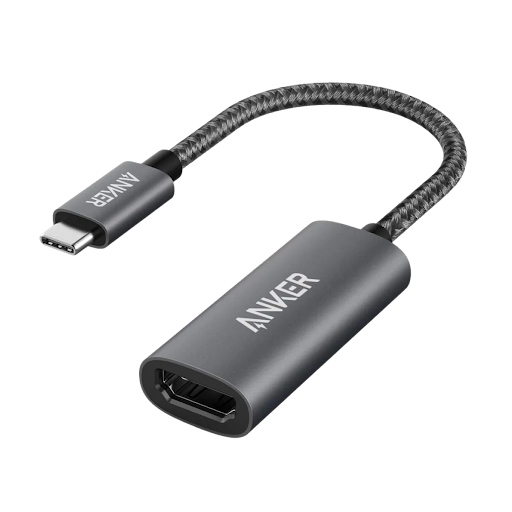
Modern technology has made our lives easier, but connecting different devices can sometimes be challenging. Laptops are becoming thinner, smartphones have fewer ports, and many accessories now rely on USB-C connections. These changes have increased the need for reliable connectivity solutions. Two useful accessories that help solve these problems are a USB C Adapter and a USB Hub.
Although both products help connect devices, they serve slightly different purposes. Understanding their features, benefits, and applications can help you choose the right accessory for your daily needs. Whether you work from home, attend online classes, travel frequently, or manage a busy office, the right connectivity solution can improve your productivity.
What Is a USB C Adapter?
A USB C Adapter is a compact accessory that allows devices with different connection types to communicate with each other. For example, a laptop with USB-C ports may need to connect to a traditional USB-A flash drive, an external keyboard, or another older accessory.
Instead of replacing your existing equipment, an adapter provides a convenient way to connect compatible devices. Some adapters support USB-A connections, while others provide HDMI, Ethernet, memory card, or charging connections.
The main advantage of a USB C Adapter is its simplicity. Most models are lightweight and easy to carry, making them suitable for students, professionals, and travelers. However, supported features depend on the specific adapter and the capabilities of the connected device.
Why USB-C Connectivity Matters
USB-C has become popular because it uses a small, reversible connector that can be plugged in either direction. Depending on the device and cable, USB-C can support data transfer, power delivery, and video output.
This flexibility makes it useful for modern laptops, tablets, smartphones, monitors, and storage devices. However, not every USB-C port offers the same capabilities. Some support only data and charging, while others can also transmit video or deliver higher charging power.
Before purchasing an accessory, check your device specifications. Choosing a compatible product helps prevent connection problems and ensures that you can use the features you actually need.
What Is a USB Hub?
A USB Hub expands the number of available USB connections on a computer or another compatible device. For example, if your laptop has only two USB ports, a hub can provide additional ports for a mouse, keyboard, external storage drive, and other peripherals.
A USB Hub is particularly useful for people who regularly work with multiple accessories. Instead of repeatedly disconnecting one device to connect another, users can keep several compatible accessories connected at the same time.
Hubs are available in different designs, including compact travel models, desktop versions, and powered options. Some include additional features such as HDMI output, Ethernet connectivity, SD card readers, or USB-C power delivery.
The number of ports, supported data speeds, and available functions vary by model. Therefore, it is important to review the specifications before making a purchase.
USB C Adapter vs. USB Hub: Understanding the Difference

Although these accessories may look similar, their primary purposes are different.
A USB C Adapter usually converts one connection type into another. It is a practical choice when you need to connect a particular accessory that uses a different port.
A USB Hub, on the other hand, primarily expands the number of available connections. It is ideal when you need to connect several devices to a single computer port.
Some modern products combine both functions. A multiport adapter may include several USB ports, HDMI, charging input, and memory card slots. These products offer additional flexibility without requiring multiple separate accessories.
Your choice should depend on your equipment, workspace, and everyday requirements rather than appearance alone.
Benefits for Home and Office Work
A well-designed connectivity setup can make everyday tasks more convenient. Office workers often need to connect external monitors, keyboards, mice, storage drives, and wired network accessories.
Using a suitable adapter or hub can reduce cable changes and keep essential devices accessible. This is especially valuable for people who use laptops with limited built-in ports.
Remote workers can also benefit from a cleaner desk arrangement. A single connection to a compatible hub may provide access to several peripherals, although the exact setup depends on the product.
For home offices, choosing accessories with appropriate cable lengths, stable construction, and sufficient power support can help create a more organized workspace.
Choosing the Right Accessory for Travel
Travelers usually prefer accessories that are compact, lightweight, and easy to store. A small adapter can be enough for someone who only needs to connect a USB drive or another single accessory.
However, people who give presentations, work from hotel rooms, or connect several devices may benefit more from a multiport hub.
Before traveling, consider which devices you will use most often. If you need an external display, verify that the adapter supports video output and that your laptop supports the required display connection. If you plan to charge your laptop through the accessory, confirm its power delivery specifications.
A carefully selected accessory can reduce the number of separate cables and devices you need to carry.
Important Features to Check Before Buying
Not all connectivity accessories offer the same performance. Reviewing a few important specifications can help you make a more informed decision.
Port compatibility: Check whether the accessory supports the connections required by your computer and peripherals.
Data transfer speed: USB standards offer different speeds. Make sure the product supports the transfer rate needed for your external drives and other devices.
Charging support: If charging is important, check the supported power delivery standard and maximum wattage. Actual charging performance also depends on the charger, cable, and connected device.
Video output: For external monitors, confirm the supported resolution, refresh rate, and video output compatibility.
Build quality: Durable materials and secure connectors can make an accessory more reliable for regular use.
Portability: A compact design is useful for travel, while a larger powered model may be more suitable for a permanent workstation.
Common Mistakes to Avoid
One common mistake is assuming that every USB-C connection supports every available feature. The connector shape alone does not guarantee high-speed data transfer, video output, or laptop charging.
Another mistake is choosing a hub based only on its number of ports. A product with many connections may not provide the required data speeds or sufficient power for demanding accessories.
Users should also avoid ignoring power requirements. Some external drives and other peripherals may need more power than a basic bus-powered hub can supply. A powered hub may be more appropriate for such setups.
Finally, check the manufacturer’s compatibility information before purchasing. This simple step can help you avoid unnecessary returns and connection issues.
How to Maintain Your Connectivity Accessories
Proper care can help extend the useful life of your accessories. Disconnect connectors carefully instead of pulling cables by force. Keep ports free from dust and moisture, and avoid placing heavy objects on cables.
When using a hub with several devices, keep ventilation in mind, particularly if it becomes warm during operation. Use reputable chargers and compatible cables, especially when charging valuable electronics.
It is also helpful to disconnect accessories safely when transferring important files. Following these basic practices can reduce avoidable connection problems and protect your connected equipment.
Conclusion
Modern devices offer powerful features, but limited ports can make connectivity difficult. A USB C Adapter helps connect devices with different interfaces, while a USB Hub expands the available connections for multiple peripherals.
The best choice depends on how you use your devices. A compact adapter may be sufficient for simple tasks, while a multiport hub can provide greater convenience for busy workstations and travel setups. By checking compatibility, transfer speeds, charging support, and video capabilities, you can select an accessory that meets your needs.
With the right connectivity solution, it becomes easier to organize your workspace, connect essential equipment, and get more value from your existing technology.


What Is MagzyMinutes.com and What Does the Site Offer?

Theboringmagazine com Guide to Finding Articles to Read

The Role of School Leaders in Creating Innovative, Inclusive, and Student-Centered Learning Environments

How Does TalkTalk Broadband Work and What Does It Include?

Voomixi Com Uses for Readers, Freelancers, and Startups

USB C Adapter vs. USB Hub: Features, Benefits, and Uses

Who Is Jaisal Andrews? Inside the Life of Naveen Andrews’ Son

Who Is Tanja Rosner? The Untold Life Story of Tate McRae’s Mother

Who Is Saffron Le Bon? The Untold Life Story of Benjamin Compston’s Wife

Voozon.com Explained: What It Really Is Behind the “Knowledge Platform” Label

Who Is Sue Johnston? The Remarkable Life Story of Joel Palmentor’s Mother

Who Is Kerri Browitt Caviezel? The Inspiring Life Story of Jim Caviezel’s Wife
-
 Celebrity2 months ago
Who Is Jaisal Andrews? Inside the Life of Naveen Andrews’ Son
-
 Celebrity2 months ago
Who Is Tanja Rosner? The Untold Life Story of Tate McRae’s Mother
-
 Celebrity2 months ago
Who Is Saffron Le Bon? The Untold Life Story of Benjamin Compston’s Wife
-
 Software1 month ago
Voozon.com Explained: What It Really Is Behind the “Knowledge Platform” Label
-
 Celebrity2 months ago
Who Is Sue Johnston? The Remarkable Life Story of Joel Palmentor’s Mother
-
 Celebrity2 months ago
Who Is Kerri Browitt Caviezel? The Inspiring Life Story of Jim Caviezel’s Wife
-

 Celebrity2 months ago
Who Is Otelia Cox? The Remarkable Life Story of Tony Cox’s Wife
-

 News2 months ago
Money6x.com: What This Personal Finance Platform Offers